
CASE STUDY · CONSTRUCTION
Automated photo reports: hundreds of pages, thousands of photos, zero copy and paste
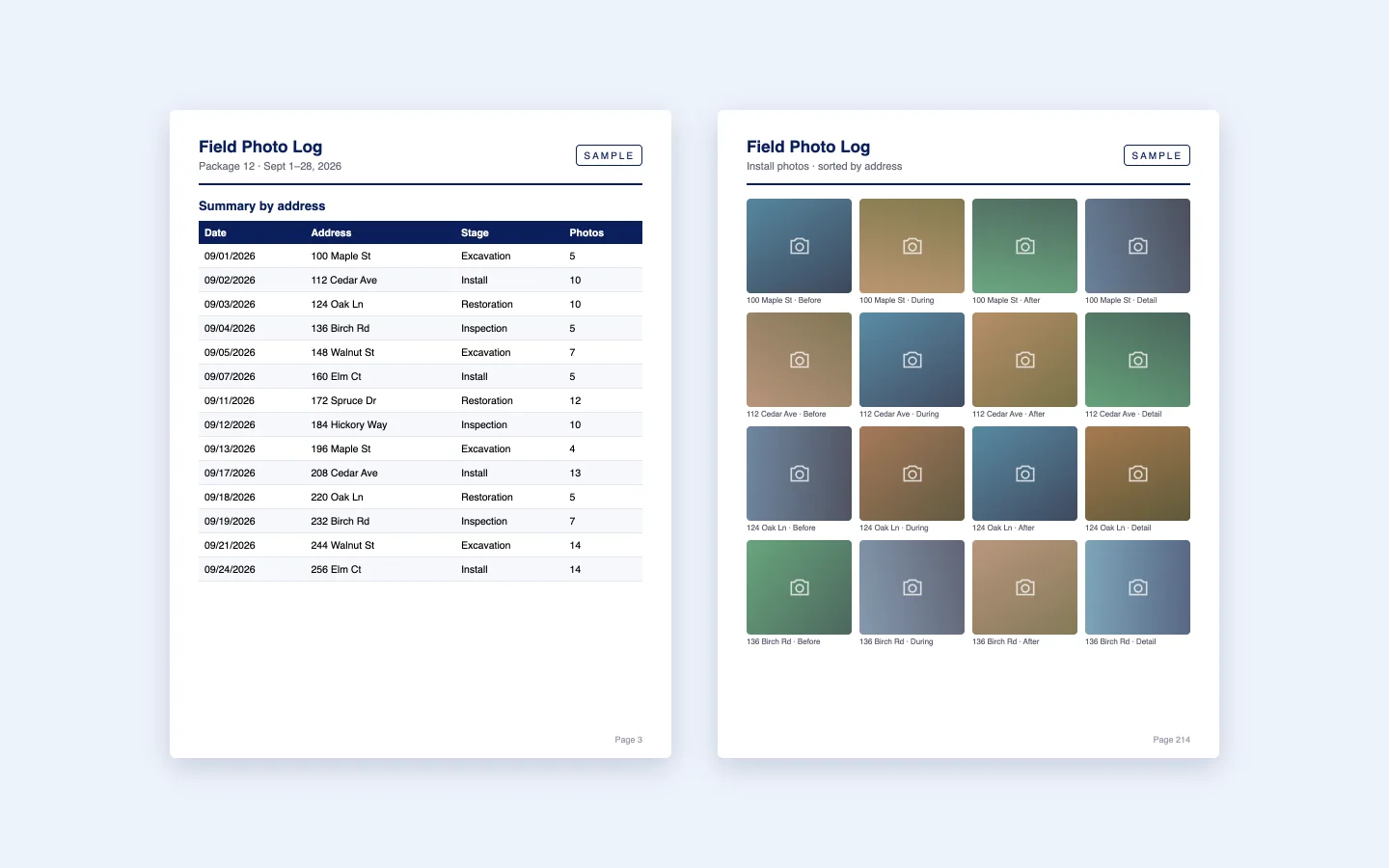
A water-infrastructure contractor documents every job with photos taken in the field. Turning those photos into the reports its customers require used to be slow, manual work. Peace Builders built a cloud function that does it automatically: a request from the field app produces a finished, sorted, photo-packed PDF report, delivered by email.
Cloud automation · Runs on Microsoft Azure
600+
pages in the largest reports
~2,000
photos placed in a single report
25,000+
photo records searched per request
1 click
from the field app to a finished PDF
At a glance
Who
A water-infrastructure contractor
Industry
Construction and utilities
Platform
Serverless functions connected to the client’s mobile forms platform
Timeline
Prototype in fall 2025; in production and improved through 2026
Engagement
Custom automation, ongoing support
Built with
Node.js, Azure Functions, Azure Storage queues, Adobe PDF Services, Azure email
Last updated September 30, 2026
Why the reports were a bottleneck
Crews photograph each address before, during and after the work, using a mobile forms app. Over a project, that adds up to tens of thousands of photo records.
The contractor’s customers need that work documented in formal reports: a summary by date and address, then page after page of photos, grouped and labeled. Building one by hand meant searching records, downloading photos and laying them out in a document, for reports that can run to hundreds of pages.
The forms platform could export data, but not a report in the right format and at that size.
How we approached it
- Start from what crews already use. Reports are requested from the same forms app the field team works in, with no new software to learn.
- Let the data drive the layout. The function gathers, merges and sorts records and photos, then fills the contractor’s own Word template, so the report looks the way their customers expect.
- Design for big jobs. The work is split into queued stages so even the largest report finishes reliably within cloud time limits.
We prototyped against real exports first, then moved it into production and kept adding report types and templates as the contractor’s needs grew.
How the report generator works
When someone requests a report, the forms platform sends the request to our function. Everything after that happens automatically in the cloud.
What’s inside
- An instant answer, then the heavy lifting. The request is accepted in seconds and queued; the person gets an email saying the report is on its way.
- Fast data gathering. Photo records are pulled in large pages, several at a time, and filtered to the right package and date range.
- Every photo checked. Each photo link is verified before it goes in the report, with retries when the source is busy and a cache so repeat reports run faster.
- Smart merging and sorting. Entries for the same address and date are combined; tables are sorted by date and address; photo grids are grouped by address.
- The contractor’s own templates. Reports are filled into Word templates, chosen automatically by report type, and rendered to PDF.
- Clear failure handling. If something goes wrong, the requester gets an email instead of silence.
Keeping it fast as the data grows
We also built a scheduled archiver. Every morning it moves photo records older than three months into quarterly archives, with a dry-run mode, an audit log and summary emails. The live data stays small, so report requests stay quick.
Built with
- Node.js on Azure Functions: web request, queue and scheduled functions.
- Azure Storage: queues between stages and storage for request data, job data and the photo-check cache.
- Adobe PDF Services: Word template to PDF rendering.
- Azure Communication Services: status and delivery emails.
What changed for the contractor
- Reports on request. A report that used to be assembled by hand now arrives by email automatically.
- Consistent, professional output. Every report follows the same template, sorting and labeling.
- Scales with the work. Reports of 600+ pages and about 2,000 photos come out of the same process as small ones.
- A foundation for more. We’re extending it into a configurable report engine where new report types are set up rather than coded from scratch.
Is someone on your team still building reports by hand?
If your data already lives in an app, a form or a database, the report can usually build itself. We connect to the tools you already use and deliver documents in your format.
Your Software Department™ builds automations like this on a flat monthly subscription: unlimited software requests, daily progress updates, and most requests shipped in 3–7 days. See how Your Software Department works →
Questions about automated PDF reports
Yes. In this project, a request from the field team’s forms app triggers a cloud function that gathers the records and photos, sorts them, fills a Word template and emails the finished PDF.
Very large. This generator produces reports of 600+ pages with about 2,000 photos, by splitting the work into queued stages that each finish within cloud time limits.
Yes. The report is filled into the company’s own Word templates, so it matches the format their customers already expect.
Every photo link is checked before it’s placed. Broken links are left out instead of breaking the report, and failed jobs send an email so nothing fails silently.
Yes. Peace Builders, an Indiana software studio, builds custom automations that turn data from your existing apps, forms and databases into finished documents.
Ready to stop building reports by hand?
Tell us where your data lives and what the report should look like. We’ll tell you honestly what it would take.